Hardening the Host: Signed Updates, Native AOT, and Turning a Terminal into a Workspace
How 1,061 commits added fail-closed authentication, OSC-7 directory tracking, File Radar, tmux compatibility, and Native AOT binaries.
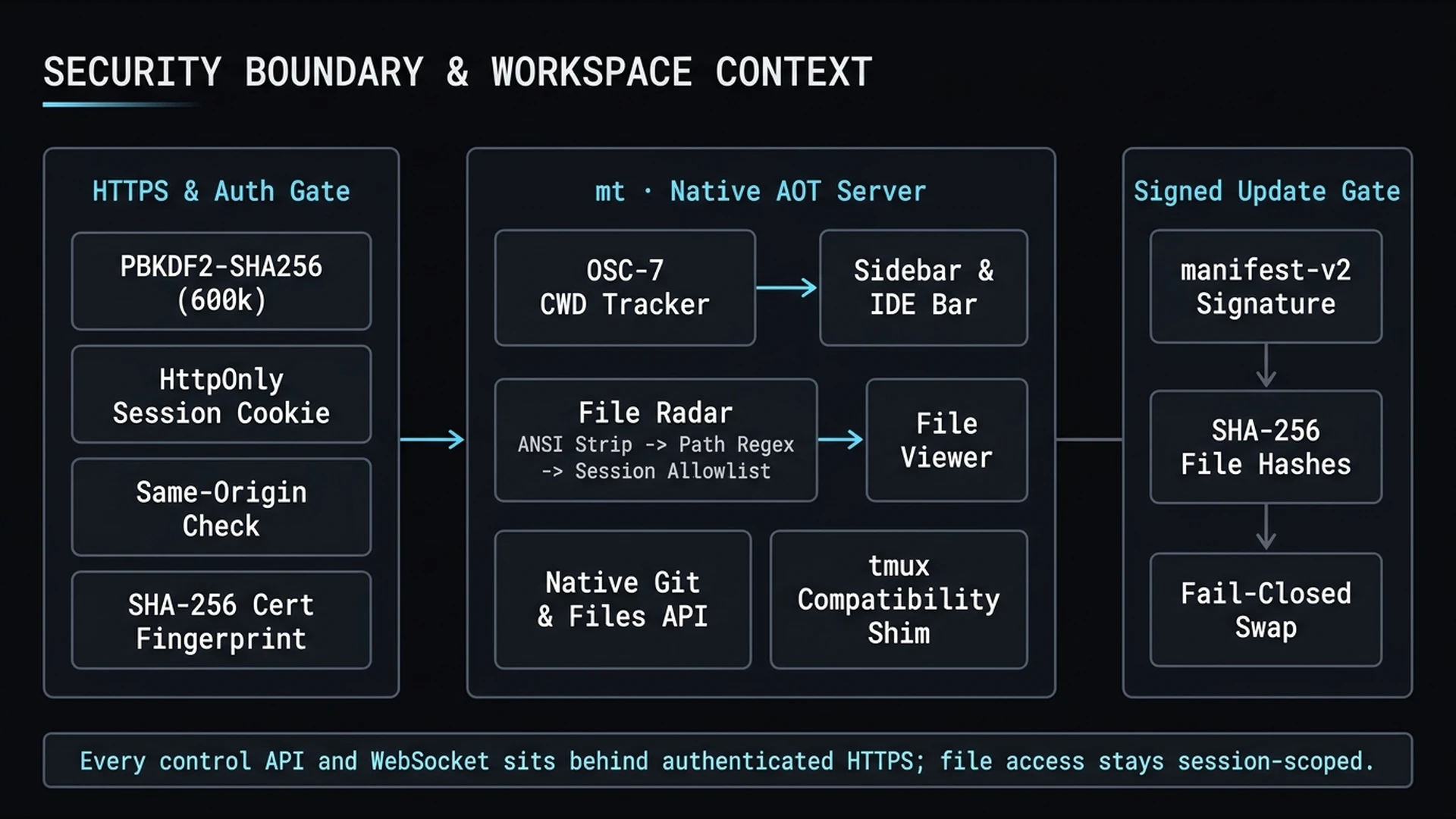
Once persistent browser terminals worked reliably on Windows, macOS, and Linux, exposing a shell over HTTPS raised two immediate engineering questions: how do we make the trust boundary fail closed under every edge case, and how do we give the browser enough workspace context so the user is not blind to files and Git state?
Between January 6 and February 18, 2026—1,061 commits spanning v6.0.0 through v7.2.0—tlbx grew from a terminal stream into a hardened, Native AOT workspace runtime.
Closing Every Auth and Update Loophole
Running a web-accessible terminal host means there is no room for "optional security." Starting with the v6.0.0 security hardening release (and carried forward in docs/CommunicationSecurity.md), we enforced strict defaults:
- Authenticated HTTPS everywhere: Control APIs, WebSockets, file endpoints, sessions, and diagnostics all require valid credentials. A missing password locks the instance rather than falling back to open access, even on loopback.
- Strong key derivation and cookie boundaries: Passwords are hashed with PBKDF2-HMAC-SHA256 (600,000 iterations), serialized to bound CPU under brute-force attempts, with accumulating lockouts and
HttpOnly,SameSitesession cookies plus same-origin checks on browser mutations. - Out-of-band certificate verification: Users verify self-signed host certificates by comparing the SHA-256 fingerprint printed on the host (
mt --fingerprint) against the browser's TLS viewer rather than trusting page text alone. - Signed updates (
v6.0.3/v6.0.6): The built-in updater verifies signed release manifests and SHA-256 hashes for every packaged binary before touching an active installation.
Native AOT and Embedded Assets
In v5.12.0, v6.4.0, and v7.0.0, we committed fully to .NET Native AOT with source-generated JSON serialization and embedded precompressed frontend assets:
- Zero runtime SDK prerequisite on target machines—
mtandmthostship as self-contained native executables. - Zero-allocation hot paths (
v6.4.0) and async IPC (v6.15.0) trimmed terminal latency and startup overhead. - Frontend assets are embedded directly into the server binary so there is no mutable on-disk
wwwrootdirectory that can drift out of sync with the running binary during upgrades.
In v6.14.0, we also introduced an OpenAPI spec-first API layer, generating typed TypeScript clients directly from the server's OpenAPI contract so frontend/backend schema drift fails at build time.
Giving the Browser Live Workspace Context
A raw terminal only shows a stream of characters. When you supervise multiple coding agents across repositories, you constantly need to know where each shell is, which files it just mentioned, and what changed in Git.
Three subsystems shipped in v6.10 through v7.1 solved this without forcing an editor replacement:
1. Server-Side OSC-7 Working Directory Tracking (v7.0.1 / v7.0.9)
Shells emit OSC-7 escape sequences whenever the current working directory changes. Parsing those sequences on the server keeps the sidebar, IDE bar, and file browser synchronized with the live shell CWD—and persists terminal titles across browser reloads (v7.0.10).
2. File Radar with Session-Scoped Allowlisting (v6.10.0 / v6.11.0)
Terminal output is full of compiler errors, stack traces, and agent summaries referencing file paths. File Radar (fileLinks.ts + fileRadar.patterns.ts) scans debounced output frames, strips ANSI codes, rejects false-positive URLs/domains/version tokens, and underlines valid Unix, Windows, UNC, and relative paths directly inside xterm.
Crucially, clicking a link does not open arbitrary filesystem access. Detected paths are registered via /api/files/register into a bounded per-session allowlist (SessionPathAllowlistService) checked alongside working-directory scoping and path-traversal guards on every read.
3. Native Git Panel, IDE Tabs, and tmux Compatibility (v6.18–v7.1)
v6.18.0 added a tmux compatibility shim so agents and scripts expecting tmux split-window or pane targeting can orchestrate real tlbx sessions. v6.20 and v7.1 added the IDE bar, syntax-highlighted file viewer, and live Git status panel—turning each terminal tab into a self-contained workspace view.
Milestone Summary
- Commits in phase: 1,061 (
2026-01-06to2026-02-18) - Key tags:
v6.0.0,v6.6.0(org rename totlbx-ai),v6.10.0,v7.0.0,v7.1.0 - Durable result: Authenticated HTTPS boundary, Native AOT binaries, OpenAPI-typed frontend, OSC-7 CWD sync, allowlisted File Radar, and native Git/Files panels. Read the full architecture overview and security documentation.