tlbx Link: Encrypted WebRTC Remote Access Without Opening Host Ports
Adding native Git and Files workflows, direct voice orchestration, and peer-authenticated WebRTC + TURN tunnels so any browser reaches your workstation safely.
Up through v10.17, using tlbx away from your LAN meant bringing your own VPN (such as Tailscale or WireGuard) or reverse tunnel. That remains a great default on machines you control end to end—yet corporate laptops, phones on restricted networks, and quick checks from a second device often cannot install a VPN client.
Between September 26 and November 6, 2026 (615 commits covering v10.18.0 through v10.26.0), we completed the native workspace panels, added direct voice orchestration, and shipped tlbx Link: encrypted WebRTC remote access with TURN fallback and browser-held cryptographic keys.
Native Files, Git, and Persistent Boards (v10.18–v10.23)
Before opening the workspace over wide-area mobile links, the core review surfaces had to stand on their own without needing a separate IDE window:
- Files workspace & safe editing (
v10.18.0): Fast directory navigation, bounded file previews, conflict-aware saving, and clean recovery paths. - Native Git workflows (
v10.19.0): Branch status, staged/unstaged diffs, commit inspection, and session-scoped repository monitoring directly inside the browser shell. - Provider controls & direct voice orchestration (
v10.20–v10.22): Native model/effort/permission controls for Agent Controller sessions, plus/ws/voice—a direct realtime voice orchestration layer sitting above existing terminal and ACP sessions rather than inventing a separate silo. Voice tool calls reuse the browser's authenticated APIs directly. - Persistent Boards (
v10.23.0): Evolved Action Graphs into durable project canvases linking task sessions, local programs, and embedded browser previews.
Designing tlbx Link Without a Trusted Central Proxy (v10.24–v10.25)
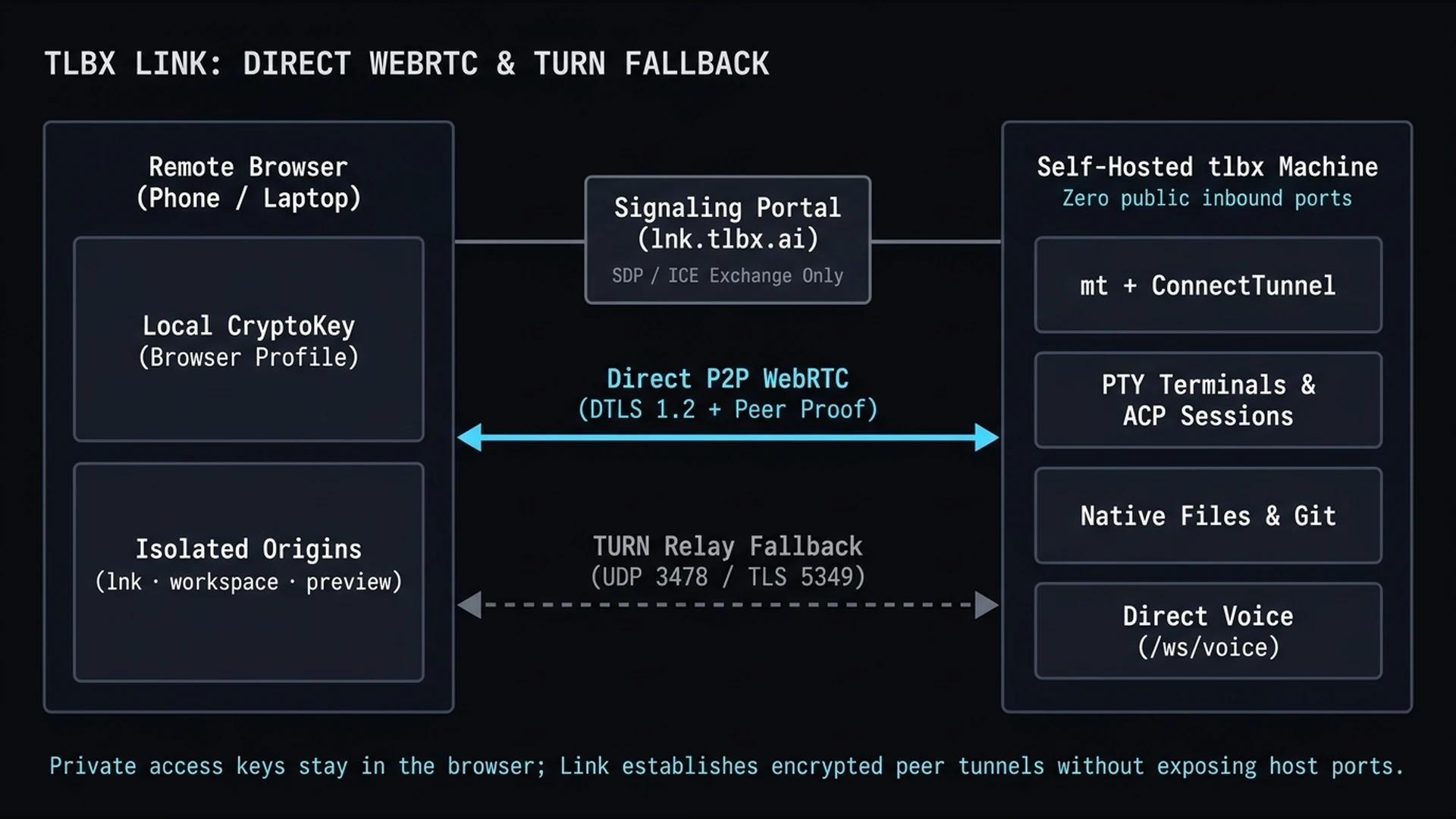
The primary design constraint for tlbx Link (lnk.tlbx.ai) was straightforward: never require opening inbound ports on the user's workstation, and never give the signaling portal plaintext access keys or unauthenticated reach into a host.
| Component | Responsibility & Trust Boundary |
|---|---|
Local Browser CryptoKey |
Generated and stored locally inside the trusted browser profile; private key material never leaves that browser |
Signaling Portal (lnk.tlbx.ai) |
Coordinates SDP/ICE exchange and signed presence for human-readable /<slug> machine bookmarks; does not hold your host credentials |
| Origin Isolation Trio | Separate origins for account (lnk.tlbx.ai), trusted workspace (workspace.lnk.tlbx.ai), and untrusted app previews (preview.lnk.tlbx.ai) so previewed web apps cannot touch workspace keys or cookies |
| Direct P2P WebRTC + Peer Proof | Primary data path over DTLS 1.2 WebRTC directly between browser and native ConnectTunnel inside mt |
TURN Fallback (UDP 3478 / TLS 5349) |
Authenticated coturn relay when restrictive NATs or corporate firewalls block direct UDP hole-punching |
On the host side, native WebRTC bindings (libdatachannel / libnice) were compiled from frozen, hash-audited recipes per platform RID so offline builds and CI remain reproducible.
Bulletproofing Windows Installation & Recovery (v10.26.0)
Alongside Link, v10.26.0 (November 6, 2026) overhauled Windows installation and service recovery:
- Typed
New-Serviceand CIM SCM management replaced legacysc.execommand-line quoting (which Windows PowerShell 5.1 UAC elevation could split). - Fresh installers hash passwords locally with 600k-iteration PBKDF2-SHA256 before downloading binaries, verify signed native
--versionoutput before stopping an existing service, complete full binary backups before any file swap, and verify local HTTPS health before adjusting trust or firewall state.
Milestone Summary
- Commits in phase: 615 (
2026-09-26to2026-11-06) - Key tags:
v10.19.2,v10.22.0,v10.24.0-dev,v10.25.0-dev,v10.26.0 - Durable result: Native Files/Git review, direct voice orchestration, hardened Windows installers, and peer-authenticated WebRTC/TURN remote access via tlbx Link. Read more on
/remote-coding-agents.